Clip-Share Upload Video Internal Server Error
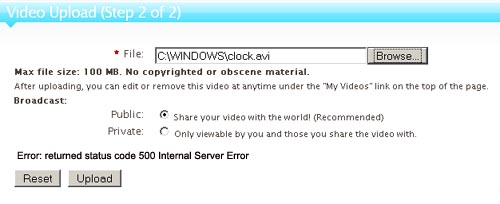
Clip-Share is mature script to run your own video sharing website like YouTube. This script is available variety of features and options at low cost. Unfortunately, they don’t have good knowledge base to short out technical problems related to script installation. The common problem with Clipshare and other video sharing script is in video upload and? conversion module.? Here is the error i received while i tried to upload video. The script produce error in initialization of progress bar.
Error:? “returned status code 500 Internal Server Error”
Possible Solution:
- Check cgi-bin directory and files permission. In the script, upload progress monitored by perl script so that cgi-bin directory and files inside directory should have 755 permission. Make the changes if applicable.
- Check temp and video path setting in “cgi-bin/configs/uu_default_config.pm” file. It should point to correct folder.? Both these folder should be writable by webserver.
temp_dir? ? ? ? ? ? ? ? ? ? ? ? ? ? ? ? => ‘/home/domain/public_html/tmp/’,
upload_dir? ? ? ? ? ? ? ? ? ? ? ? ? ? => ‘/home/domain/public_html/video/’, - Check flvideo folder permission in your installation directory. It should be writable by webserver.

i also have this problem, please clear my problem
Have you tried above solution?
i don’t know, how to do, may i send my control panel details, please slove my problem
hi ..i have the same problem..have done all the things mentioned above but it still gives the 500 internal server error…please could you help
Cheers for the informative blog post, I truly appreciated it.
I would certainly highly recommend this learning resource to other folks and encourage you to check out
my own reference directory as well. Thank you and enjoy a great day!